> For the complete documentation index, see [llms.txt](https://sharinghub-eng.kittenbot.hk/llms.txt). Markdown versions of documentation pages are available by appending `.md` to page URLs; this page is available as [Markdown](https://sharinghub-eng.kittenbot.hk/scientific-measuring-device-kit/measuring-ph-level.md).

# Measuring pH Level

<figure><img src="https://files.gitbook.com/v0/b/gitbook-x-prod.appspot.com/o/spaces%2F6uJvpXC43onNIIwhMlWo%2Fuploads%2FGyPNdp0KfxcB7sXjSU86%2Fimage.png?alt=media&#x26;token=e59432f7-bf84-41bd-a4ee-47b167b93876" alt=""><figcaption></figcaption></figure>

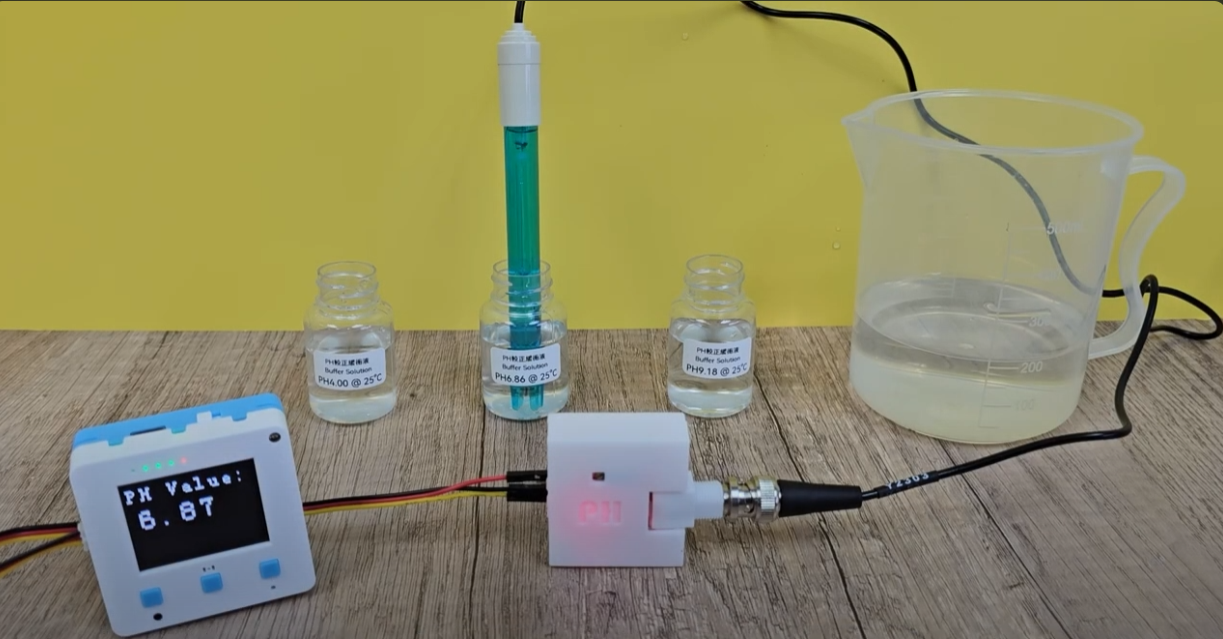
Human activities emit pollutants into the water that affect the pH level and harm aquatic life.

### Experiment Preparations

#### Prepare the following equipment:

* Futureboard Lite
* pH measuring device
* 3 color connecting cable

#### Wiring

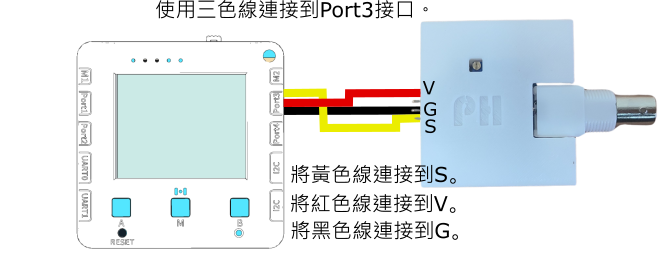
Connect the pH measuring device to futureboard lite.

<figure><img src="https://files.gitbook.com/v0/b/gitbook-x-prod.appspot.com/o/spaces%2F6uJvpXC43onNIIwhMlWo%2Fuploads%2FOpEfYVFgck3oY5DWTt9j%2Fph_wiring.png?alt=media&#x26;token=12df7d8f-b76c-418a-af61-613cf1cb2e28" alt=""><figcaption></figcaption></figure>

#### Select Program

Open 「pH酸鹼值.py」.

{% embed url="<https://youtu.be/SaZO2MJzdlM>" %}

#### Begin Measurements

First, put the device into the pH 4.0 buffer solution and wait 2 minutes, then press button A to calibrate.

Then wash and wipe the device completely and put the device into the pH9.18 buffer solution. Wait 2 minutes then press button B to calibrate.

After calibration, futureboard lite will display the measured pH value.

{% embed url="<https://youtu.be/keSccyhM_FE?si=wbTTXVtlmf-O4V4T&t=71>" %}

### 注意事項

1. 感應器頭部帶有保護蓋，使用前請小心扭下保護瓶，然後將瓶蓋拆下來。
2. 請勿弄污、弄花感應器的頭部。
3. 請小心不要倒瀉保護瓶的液體。
4. 每次使用後都需要使用蒸餾水清潔感應器。
5. 使用過後請將保護瓶裝回，不要將感應器暴露在空氣中。
6. 這種感應器並不是即時有反應，請耐心等待1分鐘。
7. 使用上強酸/強鹼時，請加以小心並佩戴護目鏡。


---

# Agent Instructions
This documentation is published with GitBook. GitBook is the documentation platform designed so that both humans and AI agents can read, navigate, and reason over technical content effectively. Learn more at gitbook.com.

## Querying This Documentation
If you need additional information that is not directly available in this page, you can query the documentation dynamically by asking a question.

Perform an HTTP GET request on the current page URL with the `ask` query parameter:

```
GET https://sharinghub-eng.kittenbot.hk/scientific-measuring-device-kit/measuring-ph-level.md?ask=<question>
```

The question should be specific, self-contained, and written in natural language.
The response will contain a direct answer to the question and relevant excerpts and sources from the documentation.

Use this mechanism when the answer is not explicitly present in the current page, you need clarification or additional context, or you want to retrieve related documentation sections.