# Futureboard Lite Operation Manual

Futureboard has the programs already preloaded, students can simply select and use the programs.

### Enter Program Selection Menu

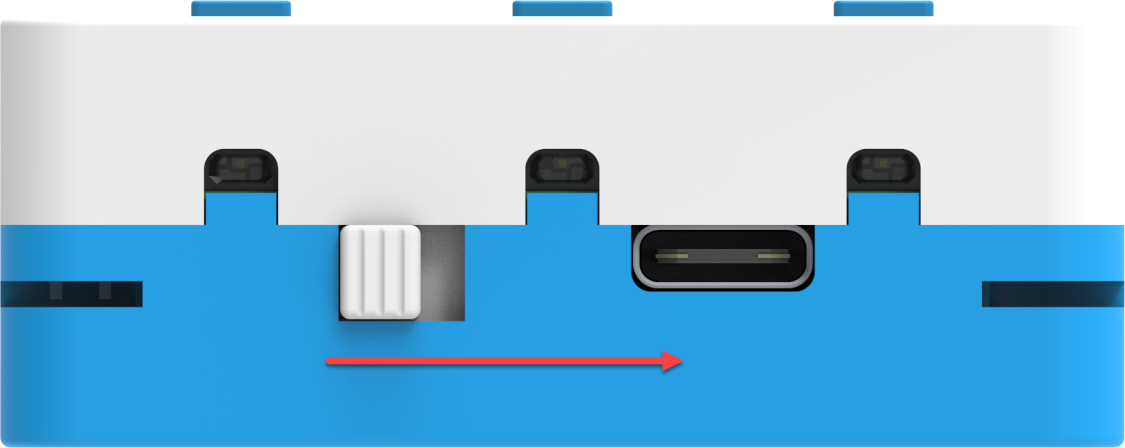
Turn on the power.

<figure><img src="https://files.gitbook.com/v0/b/gitbook-x-prod.appspot.com/o/spaces%2FsN6MlwBFbL3P67FzMMyL%2Fuploads%2FkzfTd5kl1jQuLnfSTjoA%2Fimage.png?alt=media&#x26;token=f841702f-f439-4a0a-939a-212c8b5bc3a0" alt=""><figcaption></figcaption></figure>

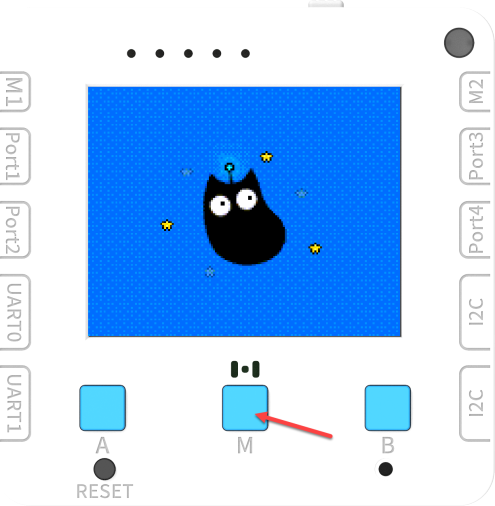
Hold the M button while it is booting up.

<figure><img src="https://files.gitbook.com/v0/b/gitbook-x-prod.appspot.com/o/spaces%2FsN6MlwBFbL3P67FzMMyL%2Fuploads%2Fv9sTxGVsibZnVyvL9WLW%2Fimage.png?alt=media&#x26;token=b8ff9644-3cbc-4d3f-8535-45c1ce6dd0c2" alt=""><figcaption></figcaption></figure>

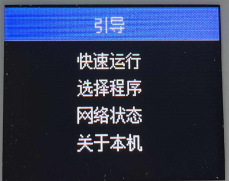
Navigate up and down with Button A and B, Button M to select.

<figure><img src="https://files.gitbook.com/v0/b/gitbook-x-prod.appspot.com/o/spaces%2FsN6MlwBFbL3P67FzMMyL%2Fuploads%2FqYd1YACoXLndcWzP9uwP%2Fimage.png?alt=media&#x26;token=f0df32ae-fa5e-449d-831c-9f1619962fc3" alt=""><figcaption></figcaption></figure>

Futureboard lite will display the list of programs preloaded onto the memory, open the necessary program with Buttton M.
---

# Agent Instructions: Querying This Documentation

If you need additional information that is not directly available in this page, you can query the documentation dynamically by asking a question.

Perform an HTTP GET request on the current page URL with the `ask` query parameter:

```
GET https://sharinghub-eng.kittenbot.hk/scientific-measuring-device-kit/futureboard-lite-operation-manual.md?ask=<question>
```

The question should be specific, self-contained, and written in natural language.
The response will contain a direct answer to the question and relevant excerpts and sources from the documentation.

Use this mechanism when the answer is not explicitly present in the current page, you need clarification or additional context, or you want to retrieve related documentation sections.
