> For the complete documentation index, see [llms.txt](https://sharinghub-eng.kittenbot.hk/llms.txt). Markdown versions of documentation pages are available by appending `.md` to page URLs; this page is available as [Markdown](https://sharinghub-eng.kittenbot.hk/functional_module/ph/info.md).

# pH Meter Info

![](https://files.gitbook.com/v0/b/gitbook-x-prod.appspot.com/o/spaces%2F6uJvpXC43onNIIwhMlWo%2Fuploads%2FSmSnAuj245SoLwQ2wKv0%2F20240729_131949.jpg?alt=media\&token=96268026-07ce-400b-9cb5-58be256e79f5)

pH Meter can measure the acidity level of a liquid.

### Product Specifications

* Measuring Range: pH 0 \~ pH 14
* Operating Tempeature: 0\~60 ℃
* Voltage: 5V
* Reaction Time: 1 minute

### Product Contents

1. pH Sensor
2. pH Sensor Adapter
3. pH4.00 Calibration Solution
4. pH6.86 Calibration Solution
5. pH9.18 Calibration Solution

### Precautions

1. The sensor has a protective casing, before using the sensor, carefully twist off the cap and remove the protection bottle, then remove the cap.
2. Keep the sensor clean and scratch-less.
3. Be careful not to spill the liquid in the protective bottle.
4. Clean the sensor with distilled water after everyuse.
5. Do not expose the sensor to air, always put the protective casing back on after using.
6. The sensor does not react immediately, please wait 1 minute after submerging in a solution.
7. Please wear protective goggles when dealing with strong acid/alkaline.

### Hardware Connection

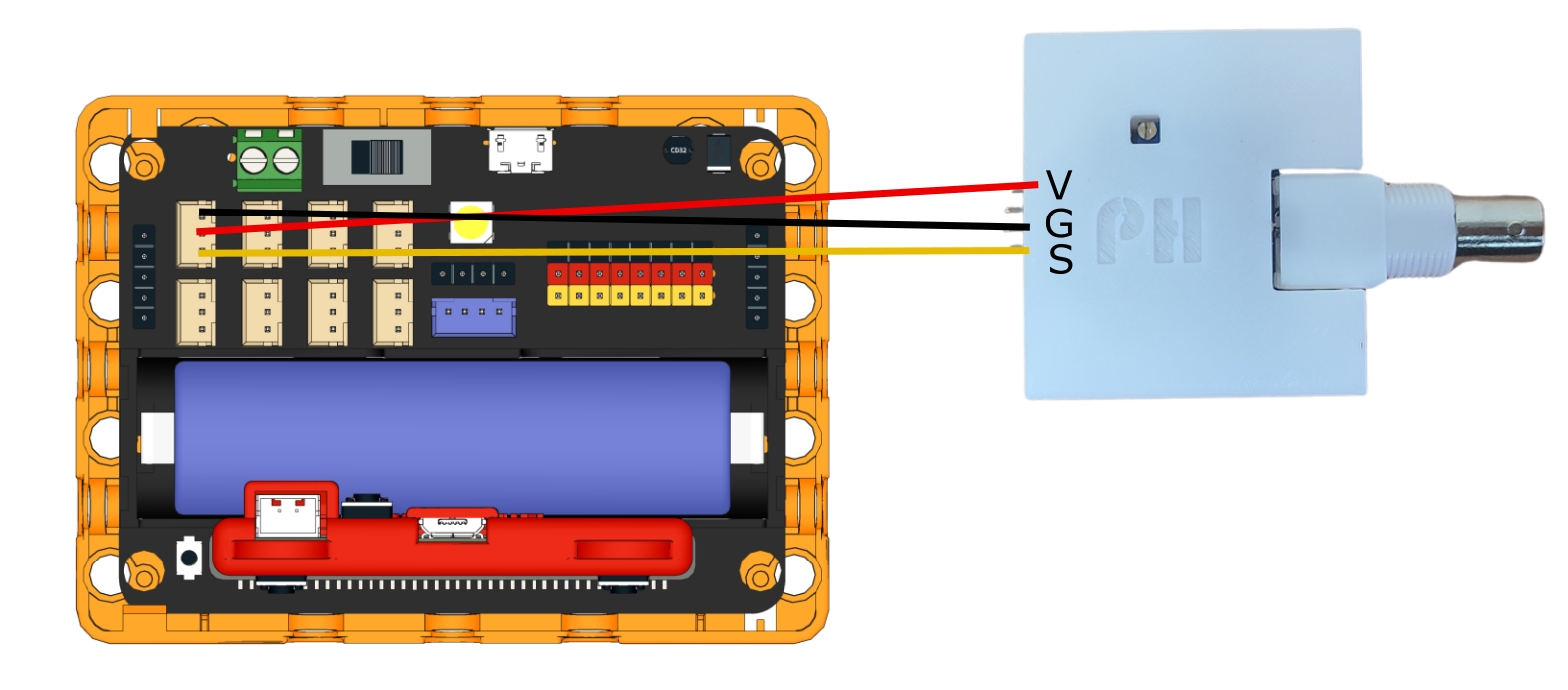
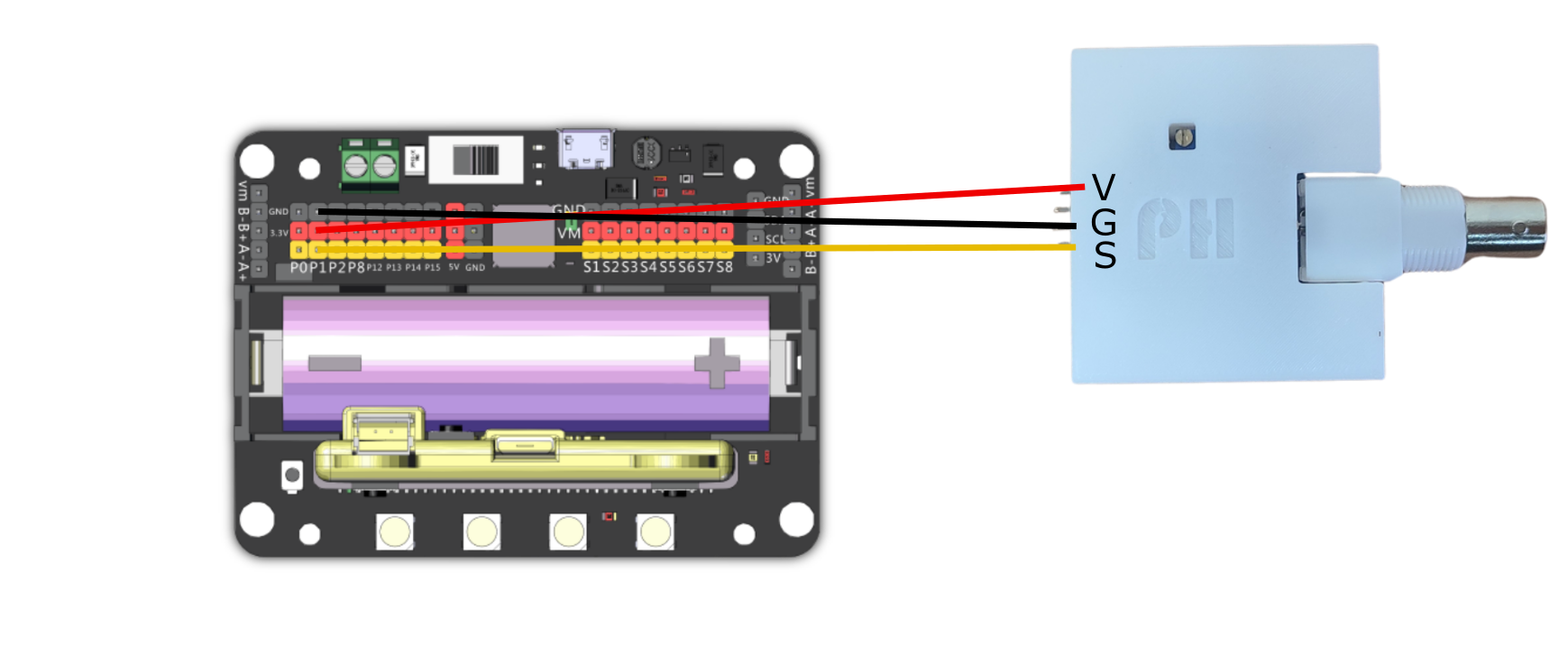
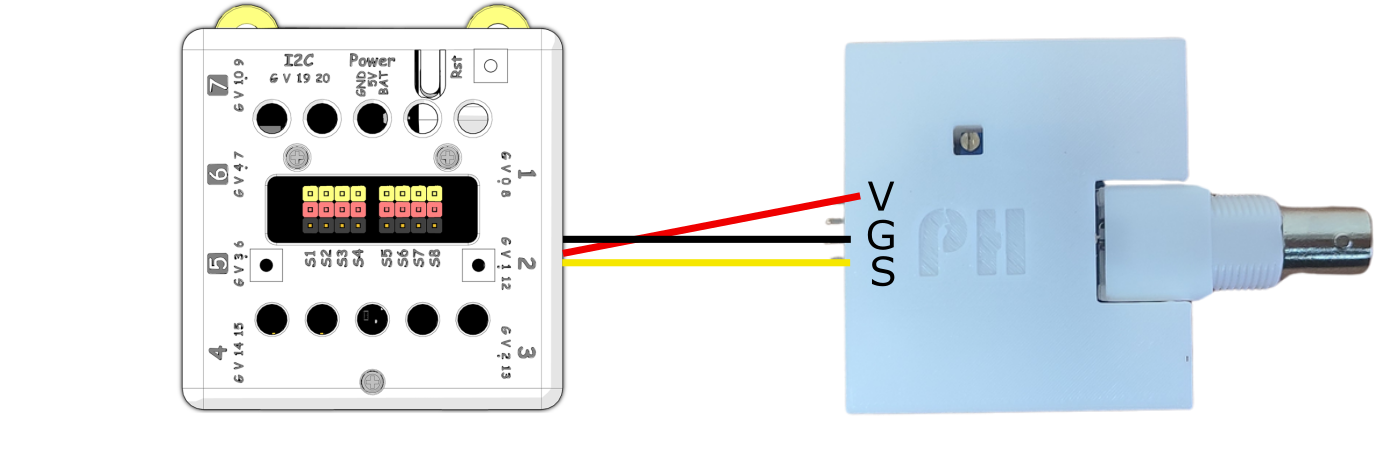
Connect 3V to VCC, GND to GND, S to Analog Pin.

{% hint style="info" %}
This is an analog sensor, connect the module to analog pin.
{% endhint %}

### Robotbit EDU

<figure><img src="https://files.gitbook.com/v0/b/gitbook-x-prod.appspot.com/o/spaces%2F6uJvpXC43onNIIwhMlWo%2Fuploads%2FFJyuuqIYZyJ6FgTBExaU%2Fph_edu.png?alt=media&#x26;token=1da68f0b-ca20-4346-a9de-f5c5bb52af37" alt=""><figcaption></figcaption></figure>

### Robotbit 2.2

<figure><img src="https://files.gitbook.com/v0/b/gitbook-x-prod.appspot.com/o/spaces%2F6uJvpXC43onNIIwhMlWo%2Fuploads%2FqOtZ6malqWQC5Hwc2W8D%2Fph_Robotbit2.2.png?alt=media&#x26;token=85f3c219-50ff-4dfe-a8b7-c0fe923f2979" alt=""><figcaption></figcaption></figure>

### Armourbit

<figure><img src="https://files.gitbook.com/v0/b/gitbook-x-prod.appspot.com/o/spaces%2F6uJvpXC43onNIIwhMlWo%2Fuploads%2FUKXU9VpaRTHjRbJav0sO%2Fph_armourbit.png?alt=media&#x26;token=32b4ca77-51ec-44e3-80ee-d6cc0d554df0" alt=""><figcaption></figcaption></figure>


---

# Agent Instructions
This documentation is published with GitBook. GitBook is the documentation platform designed so that both humans and AI agents can read, navigate, and reason over technical content effectively. Learn more at gitbook.com.

## Querying This Documentation
If you need additional information that is not directly available in this page, you can query the documentation dynamically by asking a question.

Perform an HTTP GET request on the current page URL with the `ask` query parameter:

```
GET https://sharinghub-eng.kittenbot.hk/functional_module/ph/info.md?ask=<question>
```

The question should be specific, self-contained, and written in natural language.
The response will contain a direct answer to the question and relevant excerpts and sources from the documentation.

Use this mechanism when the answer is not explicitly present in the current page, you need clarification or additional context, or you want to retrieve related documentation sections.